Labrador Labs ยท Software supply chain security

A software security alert lands. Which products or systems are affected?

Labrador Labs helps you identify open-source components in the software you build, buy or run. WorldWideMedia works with your team to establish which releases or systems need investigation, what to ask your suppliers and which fixes to prioritise.

You're responsible for software that several teams and suppliers helped build

A customer asks whether a security issue affects the product you shipped last year. Engineering has the component list for the latest release. Your supplier holds the records for an older module.

Before you can give the customer a reliable answer, you need to establish what was in the version they received.

Labrador can examine source code, compiled software or container images and produce a software bill of materials (SBOM). This inventory helps your team investigate known vulnerabilities, review open-source licences and respond to customer requests.

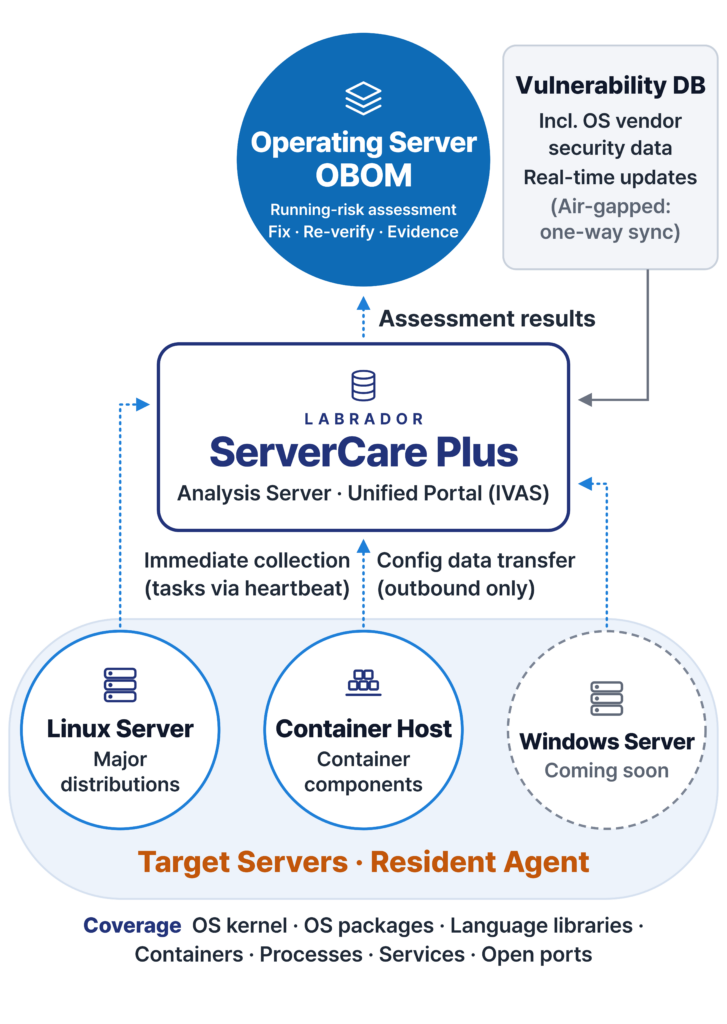
For a live service, Labrador can also show what is installed and what is actually running.

Labrador ServerCare Plus architecture. Target servers send configuration to the analysis server, which assesses the operating server bill of materials against a vulnerability database.
Your sector

Where does this fit in your business?

The same component inventory answers a different question in each of these settings.

Manufacturing, connected products and automotive suppliers

Which product versions contain the affected component?

A supplier reports a security issue in a module used across several products. Examine the software delivered for a particular model or release, then ask the supplier which versions need an update.

Software companies and SaaS providers

What can we tell our customer about their release?

An enterprise buyer requests a software bill of materials (SBOM), or an existing customer asks about a vulnerability. Produce an inventory for the relevant release and give engineering a specific finding to investigate.

Financial services and insurance

Which live services should we check first?

An alert names a component that may be present in a customer portal, claims platform or internal application. Check the relevant servers and identify where the component is running.

Using the findings

What can your team do with the findings?

Use one inventory as the shared record for engineering, procurement and customer support.

Document a release

Create a component inventory for a named release so engineering, procurement and customer support can refer to the same record.

Check a supplier delivery

Where source code is unavailable, analyse supported compiled software or container images and follow up with the supplier.

Investigate a security alert

Check whether Labrador identifies the component named in an alert, then review how your product uses it.

Prioritise maintenance

Combine Labrador's patch priorities with your knowledge of the affected service to decide what needs attention first.

Review open-source licences

Identify components whose licence terms need a closer look before distributing a product or approving a supplier delivery.

Answer a customer request

Export a software bill of materials (SBOM) in a standard format such as SPDX or CycloneDX when a customer asks for a machine-readable inventory.

What question are you trying to answer?

Bring us a customer's SBOM request, a supplier notice or a security alert your team is investigating. We'll shape the walkthrough around the product, release or service you're responsible for.

  • One release or service
  • A supplier notice or alert
  • A practical next step

Working with WorldWideMedia

What would a pilot look like?

WorldWideMedia leads the technical work with your team. Labrador Labs provides the platform and specialist support for complex integrations.

01

Choose one question

Agree what a useful answer would look like, such as an inventory for a specific release.

02

Select the software

Choose one application, delivery or server. Agree access and where the analysis should run.

03

Review the findings

Review the results with the people who know the software. Record what still needs investigation.

04

Agree the follow-up

Assign each action and decide whether to repeat the check for another release or system.

FAQ

Frequently asked questions

Potentially, yes. Labrador supports analysis of compiled software and container images as well as source code. We will review what your supplier delivered and confirm which questions that material can help answer.

Labrador offers cloud and on-premises deployment. If source code or operational data must stay within your infrastructure, we will review those requirements when scoping the assessment.

A finding gives your engineers a specific component and release to investigate. They can check how it is used, whether the reported issue applies and what action to take.

Bring one question and someone familiar with the software. A release name, an example customer request or a description of the service is enough for an initial conversation.